
Florida Rental By Owners has partnered with NextPax, a leading short-term rental channel distributor, so that the many property management systems NextPax already integrates with can send listings to FLARBO. Hosts manage their listings and bookings in their own system, and NextPax keeps FLARBO up to date.
What is a property management system (PMS)?
A property management system is the software property managers use to run their rentals. It typically covers:
- Reservations: tracking and managing bookings.
- Check-ins and check-outs: guest arrivals and departures.
- Housekeeping: cleaning schedules and tasks between stays.
- Maintenance: keeping each property in good repair.
- Billing and invoicing: payments and accurate invoices.
How does a channel manager work with a PMS?
Connecting a PMS to a channel manager makes the PMS the one place you manage reservations, rates and availability:
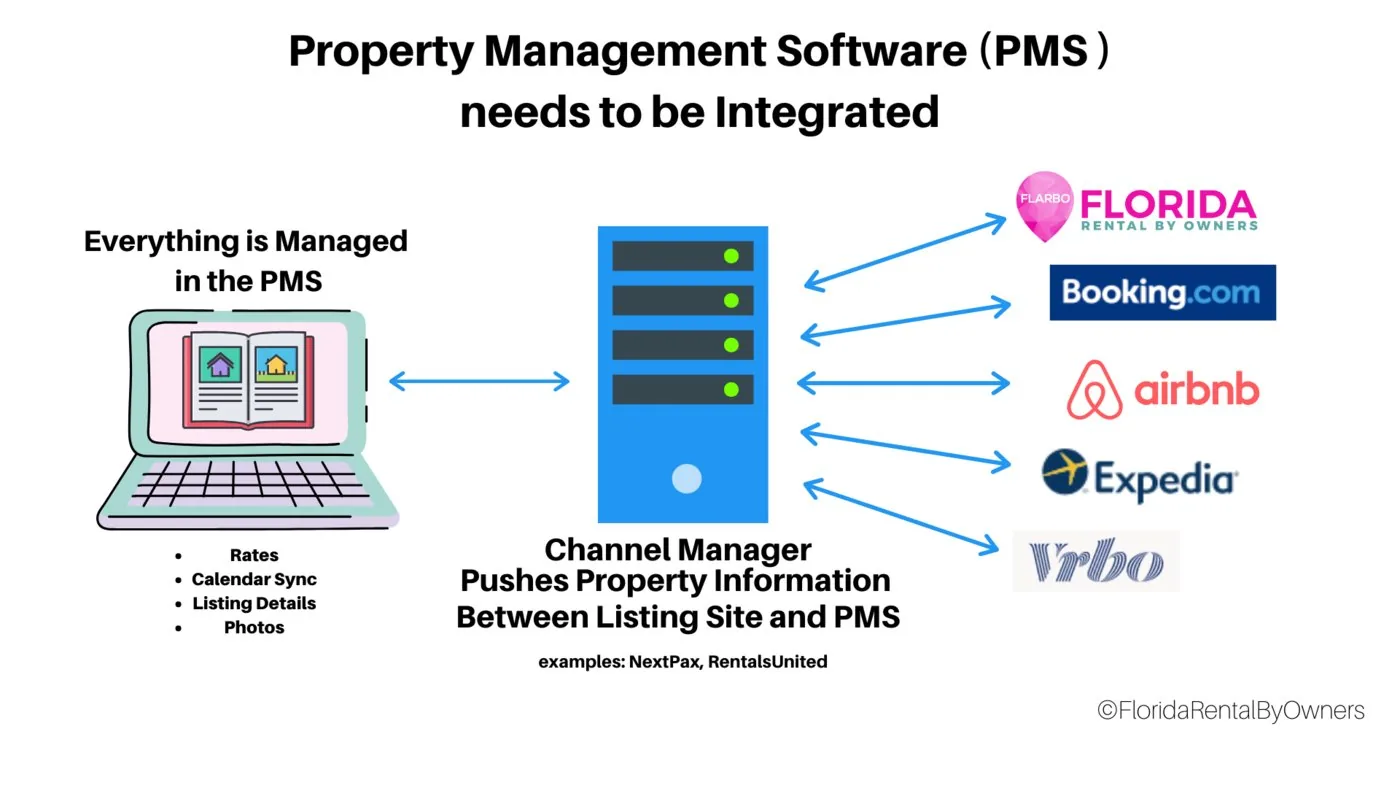
- Centralized reservations: the PMS is the hub for bookings and availability.
- Data synchronization: the PMS sends availability and rates to the channel manager, which updates every connected listing site, so dates stay consistent and double bookings are avoided.
- Real-time updates: rates and availability stay current on every platform.
Which property management systems work with NextPax?
NextPax connects with a long and growing list of systems. The Integration Zone names some that hosts often ask about, and NextPax's partner list has the full, current roster.
How to set up a NextPax connection
- 1
Have your FLARBO subscriptions ready
Make sure each property has a paid FLARBO subscription. New to FLARBO? Create a host account and list your property first. With several properties you may be eligible for a discount, so ask our team.
- 2
Set up NextPax
If you don’t have a NextPax account yet, contact us for an introduction to the NextPax team. With NextPax you will:
- Sign a NextPax agreement
- Enable NextPax as the channel manager in your PMS
- Let NextPax review your data so taxes and fees are correct
- Have NextPax enable your properties for Florida Rental By Owners
- 3
Tell us which subscription each property uses
Once your properties reach FLARBO, let our team know which subscription level goes with each one, if you bought different levels.
- 4
We connect your listings
Our team links the properties to your FLARBO listings and lets you know when they’re live.
- 5
Check your listings
Look over each listing on the site to make sure it appears correctly.
- 6
Make future changes in your PMS
From now on, edit your properties in your property management system. Changes made on FLARBO are replaced at the next sync from NextPax.
Adding a property later? Ask NextPax support to enable it for Florida Rental By Owners too, or it won't be sent to FLARBO for publication.
How do I delist a property?
Rentals are often sold and taken off the market. To remove one from FLARBO, contact customer service with your NextPax ID and FLARBO listing number.